
Sources and brief introduction are on github.
Merry Christmas!
]]>Our System.Xaml.dll was initially written in last string, which was included in Mono 2.8 and had basic type system support. It also contained XAML readers and writers too, but they were far from usable. They were tested only in a few primitive use cases, and I didn't have much time to hack them either.
After System.Xaml.dll in our git master is a lot better. I have rewritten all of XamlObjectReader, XamlXmlWriter, XamlXmlReader and XamlObjectWriter with the actual object graphs. It also involved a lot of fixes in the type system (XamlType etc.).
In addition to our class status page, I created a wiki page on System.Xaml.dll work that describes the status in human language.
It should work fine with ordinal constructs such as Type (TypeExtension), Array (ArrayExtension), List, Dictionary and IXmlSerializable (XData). But it still doesn't support lots of "settings", and attachable properties are not supported either (as we don't have WPF or anything that provides them).
Now that I feel I am done with basic features, I'd like to ask anyone who uses this System.Xaml.dll in .NET 4 try our System.Xaml.dll in git master and see if it works. Make sure that your Xaml usage is independent of things like WPF (we don't have it, so it won't work). To check this, there is MoMA.
]]>It is about WCF 4.0 implementation status in Mono. While it was not my priority, I have been somehow working on it (initially it was due to my laptop's crash and repair, now I rather want to finish this ongoing side work), it seemed good to write about it.
WCF 4.0 had added a lot of new features that didn't exist in 3.5/SP1. An excellent article by Aaron Sconnard is on MSDN, so I'll describe our ongoing effort based on the items he described.
| featured area | current status |
|---|---|
| Simplified Configuration | almost done |
| Discovery | Announcement: done. Discovery: ongoing. |
| Routing | done |
| REST improvements | not done. |
| WF4 support | no plan yet. |
(Note that this table does not contain other components such as WCF Data Services.)
In WCF4, configuration description can be reduced and it became much simpler to write. It's not always good as it also hides what WCF actually does from application developers, but almost everyone wouldn't understand what the engine does anyways, so no need to worry about that.
Default Endpoint was the last thing I actually hacked (as of now). In WCF 3.x, you always had to add service endpoints either in your app.config or by call to AddServiceEndpoint(). Since you wouldn't host more than two contract interfaces at a time and had to specify explicit endpoints for each, it is almost always waste of time, so in WCF4 it is automatically configured if you didn't provide explicit endpoint.
To achieve Default Endpoints, contract, binding and endpoint address must be provided. Since contract and endpoint can be given at ServiceHost constructors, only binding needs to be automatically guessed. And here is the practical use of Protocol Mapping. It is URIscheme-to-BindingType mapping, and the base addresses in a service host contain URI scheme.
The default Protocol Mappings are not visible in the machine.config in .NET 4.0, but they are filled at ProtocolMappingSection's InitializeDefault method. (You cannot see this overriden method in MSDN API reference - it could be confirmed through our class status pages, or some people like me could smell it because ClientSection also had overriden InitializeDefault implementation like this and hence it lacked the actual config section.)
Standard Endpoints are implemented in accordance with WCF Discovery work. While I don't really like WCF configuration stack, there would be a couple of samples that are based on configuration to run, and I didn't want to get messed just by lack of it while dogfooding.
File-less activation is also what I think nice-to-have feature, but not implemented yet. (Well, and actually whatever I haven't written here aren't yet either.)
WCF Discovery is a WS-Discovery implementation, which enables us to dynamically register and dispatch the destination information for specific type of services by announcement by service providers and queries by client consumers. Sadly it is SOAP-based and useless for other bindings.
WCF Discovery needed some tricks and underlying layers that I had to (and need to) work on:
Actually our WCF Routing implementation had been there since Mono 2.6 and I have already wrote about it, so I don't write duplicates here.
Routing configuration types are implemented, so at some stage it will be completed when some people (or we) would like to use it in practice.
REST improvements is sort of on our stack, but I have no concrete plan to work on it yet. It also applies to some new features such as receive context. WF4 support too, but it's very different as we don't have WF4 itself. BTW WF4 is made into System.ServiceModel.dll and now it messed me a lot by injecting a lot of our class status pages. As compared to that of 3.5, the number of missings looks quite big, but we don't lack new features that much.
And, while I wrote about 4.0, my primary hacking area is 3.0 stack. I'm likely go back to components that make up WSHttpBinding and further ones once I achieved duplex Discovery work.
]]>One of the most problematic one was ServiceMetadataExtension support, which is for WSDL output on the service site (the ones you get when you access to http://yourwebsite/yourservice.svc?wsdl). Yes, surprisingly. You would not understand why that is so problematic.
(0) (re)introduction
For public API wise, I once wrote an entry-level entry for entrypoint to service metadata support last year. I didn't give any explanation on its internals at all. Now it's time.
A simple code for hosting a WCF service with metadata support would look like:
var host = new ServiceHost (typeof (FooService), new Uri (uri));
host.AddServiceEndpoint (typeof (ITestService),
    new BasicHttpBinding (),
    new Uri ("", UriKind.Relative));
host.Description.Behaviors.Add (
    new ServiceMetadataBehavior () { HttpGetEnabled = true });
host.Open ();
Today, in the example above, what actually creates a working service listener is only the last line: host.Open (); only the last line matters. I explain what it's doing there, step by step.
(1) ServiceHostBase and Binding
First, I'll explain what ServiceHostBase supports and what you can do only with Binding.
Basically, ServiceHost(Base) manages more than one service "endpoint". You can call "AddServiceEndpoint" on the same host multiple times. A service endpoint is a set of an "endpoint address", a "binding" and a "service contract". You can implement multiple service contract interface within a service type (FooService) and serve requests to different interfaces at different endpoint URIs (addresses), using the same or different binding. A binding can be things like BasicHttpBinding, NetTcpBinding, WebHttpBinding, WSHttpBinding (not supported in mono yet) or anything that derives from Binding.
You might know that Binding class has a method that creates an IChannelListener object that is to actually listen for requests. Actually, to receive requests in Message form, you don't have to even use ServiceHost. Instead, you can do this:
var binding = new BasicHttpBinding ();
IChannelListener<IReplyChannel> listener =
   binding.BuildChannelListener<IReplyChannel> (
      new Uri ("http://localhost:8080/"));
listener.Open ();
IReplyChannel ch = listener.AcceptChannel ();
ch.Open ();
RequestContext ctx = ch.ReceiveRequest ();
RequestContext has a request Message that is created from the HTTP SOAP request it received. You can use Reply(Message) method to return a message in whatever form you want.
You wouldn't find it very useful. You'd rather use strongly-typed services instead so that you don't have to get messes by Message object. Also you wouldn't like to call ReceiveRequest() every time explicitly. Hence, there is ServiceHost(Base). It handles those tasks.
(2) ChannelDispatcher and EndpointDispatcher basics
When ServiceHostBase.Open() is called, the host creates a set of "ChannelDispatchers" in the host. A channel dispatcher is created for each Binding used in the ServiceHostBase (actually for each of its service endpoints).
A ChannelDispatcher manages an IChannelListener created from Binding.BuildChannelListener<TChannel> method. TChannel can be something other than IReplyChannel, but I don't explain it here (not primary topic today).
A ChannelDispatcher holds one or more "endpoint". In ServiceHostBase, there could be multiple ServiceEndpoints and they have a Binding and an EndpointAddress. Actually the Binding instance can be shared, and in such case, those ServiceEndpoints that shares the same Binding also shares the same ChannelDispatcher.
In ChannelDispatcher, the set of endpoints is represented as Endpoints property and an endpoint becomes an EndpointDispatcher. EndpointDispatcher is hence bound to a contract. When a request to the channel listener arrives (e.g. HTTP request), the ChannelDispatcher has to determine which "endpoint" (EndpointDispatcher) should process the request. Usually it is determined by its ContractFilter and AddressFilter properties, and since usually service endpoint URIs differ, it does not matter much (Use "/foo" for IFooService and "/bar" for IBarService.
... well, I wrote "basics". Yes, it is basic part. The core part starts from here.
(3) IMetadataExchange, ServiceMetadataBehavior and ServiceMetadataExtension
With BasicHttpBinding, an IChannelListener is created for HTTP scheme, and its listening URI is typically a local HTTP URI. In mono, it is either done by ASP.NET (xsp) or HttpListener (non-ASP.NET). In both cases, the services blocks the listening URI, and if we simply try to serve WSDLs using another HttpListener, there is no more room. Since WSDL requests could be sent to the same URI of the service itself, typically only differentiating the query parameter, there sould be some trick. (Do you understand it's getting messier?)
Another complication factory is that there is ServiceMetadataBehavior and ServiceMetadataExtension that have some Binding and Uri properties and show capability of handling "metadata exchange" requests. So it's not only about WSDL. Its endpoints must be exposed at users' will.
Interestingly, MetadataExchangeBindings class exposes a couple of static methods that creates a Binding for mex endpoints. And they are actually used by ServiceMetadataExtension, that is an IExtension for ServiceHostBase and realizes ServiceMetadataBehavior's requirements. Since Binding instance are different, it can create another IChannelListener, which typically has the identical listen URI as the service endpoint itself has.
The different Binding instance results in different ChannelDispatcher in the ServiceHostBase. I was originally aware of the fact that when the ServiceHostBase is opened there are two ChannelDispatchers (the reason came later). Different channel disptatchers have (again) different IChannelListener instances. And they still point to the same listen URI.
That's problematic. It makes request dispatching difficult. To make it worse, ChannelDispatcher has MessageVersion property. If they resided in the same ChannelDispatcher, it would have been easier since we could use message filters to select appropriate EndpointDispatcher. HTTP request interpretation varies dependin on the target MessageVersion. So the target ChannelDispatcher and EndpointDispatcher must be selected before IChannelListener.ReceiveContext() is done.
(4) HTTP listener manager
Hence we have to create another management layer for HTTP channel listener to reuse the same HttpListener (and some equivalent management layer for ASP.NET). Actually when Mainsoft hackers were working on it, they were aware of this issue, and created a management layer. It mostly worked until we reached the point that we have to handle more strict differentiation.
Basically, we determine if the request is GET and if the target URL matches the wsdl GET URL, then it is for WSDL. Actually there is ServiceDebugBehavior so we also handle it (if you omit "?wsdl" query parameter in your HTTP request, you'll see some "help page" for the service. It is what ServiceDebugBehavior is for).
BUT, we can't bindly determine such requests as for WSDLs. Do you remember there is WebHttpBinding? With this binding, you can access services by UriTemplate, and it is todally done by GET request (with no request stream). Whenever applicable, we should handle requests to the RESTful services within the binding. Interestingly, WebHttpBinding uses WebHttpBehavior to adjust endpoint behaviors, and it actually raises its EndointDispatcher's FilterPriority(!). So IF the endpoint dispatcher is in the same ChannelDispatcher as ServiceMetadataBehavior yields, there was no problem. Sadly, WebHttpBinding is, again, a different binding that ServiceMetadataBehavior gives, so it creates different ChannelDispatcher (as BasicHttpBinding does).
To get the higher priority settings working, we have to "hack" the order of searching appropriate ChannelDispatcher to dispatch an HTTP request, by its Endpoints (EndpointDispatchers).
All of those behaviors cannot be completely done within WCF public API. So, ServiceMetadataBehavior and ServiceMetadataExtension are special. You cannot create functionally-equivalent one without giving up some aspects (e.g. it would be able to be done if you don't allow hosting WSDL on the same URI as the service is listening).
(5) done
It had been a longstanding issue that attacked me over and over again (fix->regress->fix->regress...), and history may repeat, but I rewrote the HTTP listener stack and relevant stuff last week, it should work today, hopefully in more reliable state. And since that fixes I feel much comfortable than those annoyed days in my hacking life :)
]]>It is already in mcs tree, and not a few of them are implemented and already working, though there's a lot of things left to do.
In .NET land, there seems to be some class libs such as WPF and new Workflow that depend on it. And I'm guessing it could be reused for some sort of my own designing tool.
My primary work area is still WCF so I won't be able to finish it soon, but I hope I get it practically working by the next 2.8 release (which is not in certain scope yet).
]]>WCF router support is only in SVN trunk, in System.ServiceModel.Routing assembly, mostly in System.ServiceModel.Routing namespace. Note that .NET 4.0 is still in beta, so things may change as .NET 4 development goes on.
Message router is to dispatch messages that it received from clients, to certain servers. A WCF router is a WCF service for router client users, while the router works as a WCF client for routed services (which may not be WCF).
Routing design is almost simple: a WCF router service has a table of a message filter that is used to test if a message matches it or not, and a set of endpoints to dispatch messages it received. The table is represented as MessageFilterTable<MessageFilter,IEnumerable<ServiceEndpoint>>.
(Usually just one service endpoint is enough; simplex or duplex channels may dispatch messages to more than one service endpoints.)
Message router often has to rebuild the input message, like, adjusting message versions and To message header.
I haven't prepared an entire routing example (I tested it with MS sample in 4.0), but router usage would look like:
var host = new ServiceHost (typeof (RoutingService));
host.AddServiceEndpoint (
  typeof (IRequestReplyRouter),
  new BasicHttpBinding (),
  new Uri ("http://localhost:8081/router"));
var config = new RoutingConfiguration ();
var clientEndpoint = new ServiceEndpoint (
  ContractDescription.GetContract (typeof (IRequestReplyRouter)),
  new BasicHttpBinding (),
  new EndpointAddress ("http://localhost:8080/service"));
var list = new List<ServiceEndpoint> ();
list.Add (clientEndpoint);
config.FilterTable.Add (new MatchAllMessageFilter (), list);
host.Description.Behaviors.Add (new RoutingBehavior (config));
There is not many things to explain for WCF routing, so I'd explain its internals instead so that some people might want to write similar code for several purposes.
To host a routing service, RoutingService is used. It has four interfaces for several channel interface types;
To add routing with a specific table, you'll first have to create the table. It is represented as FilterTable property in RoutingConfiguration class. Once you have created a configured RoutingConfiguration instance, then use RoutingBehavior object, which is of IServiceBehavior interface (a behavioral extension to ServiceDescription, see Day 5 for quick introduction to "service behaviors") and takes RoutingConfiguration as its constructor argument.
Once you have set routing configuration in above manner, then what to do next is to call AddServiceEndpoint() with (1) an interface type I listed above, (2) a binding for the router "(as a) service", and (3) an endpoint address for the router "(as a) service". (1) must be determined as to comply with the routed servers' requirements, and (2) and (3) represent the endpoint information for routers' client (and of course, a client must comply with (1) to properly communicate with the router).
Those four routing interfaces I listed above, all have Message as its one input argument (and output for IRequestReplyChannel). Since the contracts are very generic, a routing service can handle any communication between the client and the routed server (i.e. since they just take Message, it involves no typed serialization regardless of the contract of the routed service).
When a RoutingBehavior is called its ApplyDispatchBehavior() with a ServiceHostBase argument, it adds RoutingExtension to the service host. Then (1) it updates its service "instance context provider" (IInstanceContextProvider) that instantiates a RoutingService (which has no public constructor) and sets the routing configuration to it, and (2) creates a set of clients for the dispatched services internally.
There is another "endpoint behavior" SoapProcessingBehavior. It takes part in the router-to-service communication and adjusts messages (as I explained above e.g. updating message versions). You don't have to deal with it.
It is in very early stage and in fact I only tried request-reply style router.
Our Routing stack should work on .NET 3.5 too. Try "make" under mcs/class/System.ServiceModel.Routing - it will build mcs/class/lib/net20/System.ServiceModel.Routing.dll i.e. for 2.0 profile. There is nothing new I depended for its underlying layer.
]]>NetPeerTcpBinding involves a lot of complicated things, so I'm not likely to explain a lot.
NetPeerTcpBinding itself is a binding for duplex messaging with binary message encoders (like NetTcpBinding) and its own transport, namely PeerTransportBindingElement. It also involves a "peer resolver" which is used to manage peer node statuses.
PeerTransportBindingElement is a transport binding element like HttpTransportBindingElement or TcpTransportBindingElement. While HTTP endpoint is a typical http URI (locally it is most likely only about the port), and TCP endpoint is about an IP endpoint (I forgot to mention yesterday, but its URI is like "net.tcp://localhost:808"), peer transport endpoint is about a "mesh" name which is handled by a "peer resolver". Its URI looks like "net.p2p://mymesh/" . Messages are transmitted to all the "peer nodes" in the specified peer "mesh".
(If you read PeerTransportBindingElement API, you'd notice that it takes an IP endpoint for listening peer connections. But it is not the endpoint - peer transport indirectly uses it, unlike an IP endpoint for TCP endpoint.)
Actually, a peer resolver, which is represented as PeerResolverBindingElement, is more inportant to know the actual peer transport destination. On .NET there are (nominally) two ways to "resolve" peer nodes to transmit messages: (1) PNRP, represented as PnrpPeerResolverBindingElement is Windows peer node resolution protocol, and (2) custom resolver, represented as PeerCustomResolverBindingElement, is resolver-instance-by-user peer resolver with IPeerResolverContract and CustomPeerResolverService API.
With PNRP you don't have to specify anything to resolve peers. It is however not available in Mono (PNRP is Windows specific and I haven't spent any time to implement it). With custom resolver, you have to (only) specify a service endpoint (Binding and EndpointAddress) to IPeerResolverContract service, which is typically CustomPeerResolverService.
Having your host is simple. Just create a ServiceHost with CustomPeerResolverService and add a service endpoint for IPeerResolverContract.
(NOTE: As it depends on NetTcpBinding and it has some blocking issues right now, this binding does not likely work fine either.)
I haven't written any cool net-peer application beyond simple tests. Instead, I used chat application which used to be the top Google results for "WCF application". The server isn't really a peer channel server but rather a custom peer resolver, but the clients show basic use of net-peer communication.
The example code makes use of PeerNode and its interface IOnlineStatus.
The public peer resolver API does not tell much, but its internals are complicated. It has to provide several operations such as, register node to the target mesh (Register), resolve nodes in the target mesh (Resolve), updates node availability statuses (Refresh) and unregister the node from the mesh (Unregister).
Microsoft has a dedicated Windows protocol documentation. The expected peer resolver mechanism is documented as [MC-PRCR] and [MC-PRCH].
In .NET, CustomPeerResolverService internally uses PNRP to implement IPeerResolverContract, So, while "nominally" custom peer resolver is one of the two peer resolver kinds, there is actually only PNRP on .NET.
In Mono, I created BasicHttpBinding-based ad-hoc peer resolver service that is launched within a mono process that uses custom resolvers (the internal "LocalPeerResolverService" class in System.ServiceModel.dll implements the service). It checks port 8931 availability, and if it is already used then it premises as if it were occupied by another custom resolver of our implementation. This behavior may change in future versions.
It is a trivia I found during NetPeerTcpBinding hacking. You cannot expose WSDL for IPeerResolverContract using ServiceMetadataBehavior (see Day 5) because of duplicate global element for 'http://schemas.microsoft.com/net/2006/05/peer:Update' . 99.999% of WCF users wouldn't have to do it though (say, you don't have to implement CustomPeerResolverService).
The reason for this is complicated: it is because RegisterResponseInfo and UpdateInfo have conflicting return element name "Update" (in the same XML namespace) due to its MessageBodyMemberAttribute. That's my guess though - as IPeerResolverContract methods use message contracts for its argument and return value types. But as the contract there wouldn't be other possibilities so it should be almost precise.
The above story is almost nothing for you. But this kind of faulty contract design could happen by chance and it cannot be checked very obviously. The only way I can suggest to try to avoid such problem is to check WSDL generation frequently (like, every time you change the message contract).
]]>In short, NetTcpBinding is WCF-only, non-interoperable binding based on binary messages and TCP transport.
"Binary XML" is not really XML. It is fake, a buzzword. It actually means, a binary representation based on XML Infoset (or something, depending on what it would describe). In WCF land, binary XML usually means an XML binary format used by XML reader and writer from XmlDictionaryReader.CreateBinaryReader() and XmlDictionaryWriter.CreateBinaryWriter().
While we have corresponding implementation since 2005, its data format has been recently published as [MC-NBFX] as part of Microsoft's Windows Protocol documentation.
In WCF, there is BinaryMessageEncodingBindingElement that uses this binary XML representation to serialize and deserialize messages. You can explicitly use it as message encoder part of your binding (using CustomBinding) as I did on Day 3. NetTcpBinding uses this one without customization.
Message transport protocol also involves its own binary representation, but I have to explain "channel types" in prior. Until today I haven't explain about channel types, in other words types of IChannel interface variety - as BasicHttpBinding and WebHttpBinding are both for request-reply style communication. WCF is not only about it - it actually supports:
They may also involve sessions and in such case they become IFooSessionChannel (e.g. IRequestSessionChannel). To know which kind of messaging is supported by the Binding you are using, you can use CanBuildChannelFactory<TChannel>() method for clients or CanBuildChannelListener<TChannel>() method for servers.
It may look strange, but duplex messaging could be still used to support service method that has both invocation parameters (request) and return value (reply).
Back to NetTcpBinding, it supports two kinds of above, under different configuration; NetTcpBinding has TransferMode property and it indicates the communication channel style. If the property value is TransferMode.Streamed, then it creates request-reply type channel. If it is TransferMode.Buffered, then it results in duplex channel. While duplex channel could be used for RPC-style service calls, the underlying communication protocol becomes different. So you have to adjust the transfer mode between client and server.
The communication protocol is also documented, as [MC-NMF] and some related docs in Windows Protocol documentation.
Here is an example pair of NetTcpBinding client and server, using buffered == duplex communication mode.
[NOTE] It turned out that I brought some regressions which broke some binary message communication. It has been a while since I have implemented a couple of months ago. I've been fixing some bugs these days.
// client
using System;
using System.Xml;
using System.ServiceModel;
using System.ServiceModel.Channels;

public class Test
{
  public static void Main ()
  {
    var binding = new NetTcpBinding ();
    binding.Security.Mode = SecurityMode.None;
    var endpoint = new EndpointAddress ("net.tcp://localhost:8080/");
    var proxy = new ChannelFactory<IFoo> (binding, endpoint).CreateChannel ();
    Console.WriteLine (proxy.Echo ("TEST FOR ECHO"));
    Console.WriteLine (proxy.Add (1000, 2000));
  }
}

[ServiceContract]
public interface IFoo
{
  [OperationContract]
  string Echo (string msg);

  [OperationContract]
  uint Add (uint v1, uint v2);
}
// service.cs
using System;
using System.ServiceModel;
using System.ServiceModel.Channels;
using System.ServiceModel.Description;
using System.ServiceModel.Dispatcher;

public class Tset
{
  public static void Main ()
  {
    ServiceHost host = new ServiceHost (typeof (Foo));
    NetTcpBinding binding = new NetTcpBinding ();
    binding.Security.Mode = SecurityMode.None;
    var uri = new Uri ("net.tcp://localhost:8080");
    host.AddServiceEndpoint ("IFoo", binding, uri);
    host.Open ();
    Console.WriteLine ("Hit [CR] key to close ...");
    Console.ReadLine ();
    host.Close ();
  }
}

[ServiceContract]
public interface IFoo
{
  [OperationContract]
  string Echo (string msg);

  [OperationContract]
  uint Add (uint v1, uint v2);
}

class Foo : IFoo
{
  public string Echo (string msg)
  {
    return msg;
  }

  public uint Add (uint v1, uint v2)
  {
    return v1 + v2;
  }
}
.NET NetTcpBinding is actually capable of handling some complicated things such as message security, but we don't provide message security support yet. If you have NetTcpBinding configured to use message security, NetTcpBinding.Security.Mode has to be set as None.
]]>Yesterday I explained WebHttpBinding which is dedicated to REST world. It is however just one aspect of the new REST support in .NET 3.5. Here is another one - you can invoke remote WCF services from ASP.NET AJAX.
What's done here is, basically the same as what ASP.NET AJAX do for System.Web.Services asmx support. In asmx integration land, there is Javascript proxy generator that accesses to the remote service and returns server responses back to Javascript land. The Javascript proxy source is retrieved at http://your.host.name/service.svc/js or http://your.host.name/service.svc/jsdebug (with debugging info).
The implementation is in ProxyGenerator class in ASP.NET AJAX assembly (System.Web.Ext.dll). By using ProxyGenerator.GetClientProxyScript() method, you can see how the raw Javascript proxy code is generated from your service contract, without actually deploying your service at your host.
It matches the Javascript code that you can see at somewhere like: http://your.host.name/service.svc/jsdebug
The next question is, how to provide such Javascript proxy at ./js or ./jsdebug for each service (endpoint). When there are two or more services, there will be two or more js proxies (foo.svc/js and bar.svc/js).
To resolve this, there is "WebScriptServiceHostFactory" which adds support for those js proxies for each service endpoint. It internally uses WebScripeEnablingBehavior which is derived from WebHttpBehavior. When WebScriptEnablingBehavior is attached to a service endpoint, it adds a special request "dispatcher" (precisely, EndpointDispatcher) to the host to handle requests to ./js or ./jsdebug as to return js proxy string.
I don't explain the mechanism a lot here, but in case you are curious, ChannelDispatcher, EndpointDispatcher and DispatchRuntime have a lot of customizible things at service host.
(In my previous post, I didn't explain much about WebHttpBehavior, an implementation of IEndpointBehavior. It actually plays the primary role on the REST binding support such as, setting "message formatter" to serialize request parameters using JSON serializer, to bind to and generate parameters from "URI template", etc. etc.)
Anyways, now we have a dedicated endpoint for Javascript for each service endpoint from the service instance. The service instance should be adjusted to use WebHttpBinding which is configured to use JSON as its message format so that the service can communicate with the JS proxy running in users' browser.
The entire service host setup above is valid to standalone ServiceHost too. But it does not make sense to do so - the primary purpose of those js proxies is reference from ASP.NET AJAX web pages. Hence there is almost no use for standalone hosting.
I don't write a lot to explain how to use <asp:ServiceReference > and proxies in your ASP.NET AJAX web page (Javascript) here - our bug #525575 shows simple usage.
]]>
Sources and brief introduction are on github.
Merry Christmas!
]]>Unlike some of the topics I wrote earlier, our REST support compatibility for .NET 3.5 is almost feature complete (yes I prefer RESTians than SOAPy people).
REST services have "resources" identified by URLs, like: http://localhost/ShoppingService/Products/by-name/RupertsDanceLesson_DVD
While HTTP transport stack is reusable, the existing BasicHttpBinding does not fill such needs - the destination of its request is identified by SOAP request header or HTTP request content body. A dedicated message encoder is required.
The alternative mechanism used for processing such requests in WebHttpBinding is "UriTemplate" which is a syntax based on URI but includes expressions like '{x}'. For example: "/ShoppingService/Products/by-name/{name}"
When a client is to send a request with certain set of parameters, the client first determines the request URI by filling dynamic parts of the URI template. Then the client sends the request to the service. When the service received a request, it tries to determine which operation in the service should handle it, and extract parameter values from the actual request URI. There won't be files at the corresponding destination URI. It's all virtual.
Requests in WebHttpBinding are created as an URI. Responses in REST services are often returned as JSON. With WebHttpBinding, you can read and write JSON in certain structure - since WCF Messages are serialized as "XML", which strictly means, XmlDictionaryReader/Writer, the JSON input and output are also represented as the XML reader and writer. I don't explain the details, but you can start reading from JsonReaderWriterFactory.
There also is another specialized type for JSON serialization i.e. DataContractJsonSerializer. It reads and writes JSON instead of XML.
JSON serializer could be also used for serializing complex request parameters.
Of course, WebHttpBinding does not always use JSON. Rather, it uses POX (plain old xml) by default.
Another typical practice in REST world is use of syndication feeds such as RSS and Atom. WCF 3.5 added support for serialization of those feeds. In System.ServiceModel.Syndication namespace there is a couple of types for data contract serialization of feeds and feed items.
With WebHttpBinding the existing OperationContractAttribute is not sufficient to provide how to host services. A URI template must be associated to each operation. WebGetAttribute or WebInvokeAttribute are used onto an operation method to bind URI template. Though, you don't have to explicitly design the service URI; it will be automatically inferred like: http://...[baseuri]/[operation]?argFoo={argFoo}&argBar={argBar}...
Adding [WebGet] or [WebInvoke] does not automatically work for WCF engine to assure that it is RESTful service. You also have to use either a dedicated channel factory or a service host, or WebHttpBehavior, a custom IEndpointBehavior. While WebHttpBehavior plays the primary role for everything I explained above and more, former approach would be easier.
Now we are ready to write sample code and run.
// client
using System;
using System.ServiceModel;
using System.ServiceModel.Channels;
using System.ServiceModel.Description;
using System.ServiceModel.Web;

[ServiceContract]
public interface IMyService
{
  [OperationContract]
  [WebGet (RequestFormat = WebMessageFormat.Json,
           ResponseFormat = WebMessageFormat.Json)]
  string Greet (string input);
}

public class Test
{
  public static void Main (string [] args)
  {
    string name = args.Length > 0 ? args [0] : "anonymous joe";
    string url = "http://localhost:8080";
    WebHttpBinding b = new WebHttpBinding ();
    var f = new WebChannelFactory (b, new Uri (url));
    IMyService s = f.CreateChannel ();
    Console.WriteLine (s.Greet (name));
  }
}
// service
using System;
using System.ServiceModel;
using System.ServiceModel.Channels;
using System.ServiceModel.Description;
using System.ServiceModel.Dispatcher;
using System.ServiceModel.Web;

[ServiceContract]
public interface IMyService
{
  [OperationContract]
  [WebGet (RequestFormat = WebMessageFormat.Json,
           ResponseFormat = WebMessageFormat.Json)]
  string Greet (string input);
}

public class MyService : IMyService
{
  public string Greet (string input)
  {
    return "hola, " + input;
  }
}

public class Test
{
  public static void Main ()
  {
    string url = "http://localhost:8080/";
    WebHttpBinding b = new WebHttpBinding ();
    var host = new WebServiceHost (typeof (MyService), new Uri (url));
    host.AddServiceEndpoint (typeof (IMyService), b, "");
    host.Open ();
    Console.WriteLine ("--- type [CR] to quit ---");
    Console.ReadLine ();
    host.Close ();
  }
}
In the example above, I used WebChannelFactory<T> instead of client class which is derived from ClientBase<T>, but as long as you use a gives instance of IMyService from it, its role is almost the same as ClientBase.
Sadly WebHttpBinding is not available in Moonlight (nor Silverlight). It is not because the REST style does not fit Silverlight or RIA land in general, but because Silverlight API lacks behavioral extensibility API. I see there is no reason to not add things like IEndpointBehavior, but that's what Microsoft API does.
While WebHttpBinding is more WWW-friendly, it is not always possible to handle RESTful services. To handle JSON objects, it automatically adds type IDs during serialization and expects the IDs on deserialization.
]]>WCF is also available in iPhone land. MonoTouch had started based on "2.1" profile of Mono, which is for Moonlight, and then extended its coverage to some .NET API such as System.Web.Services and ADO.NET. Since WCF is part of Moonlight, it was also possible to get included in MonoTouch.
Here I'm sort of expecting you knowing basic how-to in MonoTouch land. I'm explaining the procedure below as what I did with MonoTouch on Snow Leopard and iPhone SDK 3.1:
        public override bool FinishedLaunching (UIApplication app, NSDictionary options)
        {
            // If you have defined a view, add it here:
            // window.AddSubview (navigationController.View);

            window.MakeKeyAndVisible ();

            this.button.TouchDown += delegate {
                var binding = new BasicHttpBinding ();
                var address = new EndpointAddress ("http://192.168.1.3:8080/test.svc");
                var client = new HelloServiceClient (binding, address);
                client.GreetCompleted += delegate(object sender, GreetCompletedEventArgs e) {
                    this.InvokeOnMainThread (delegate {
                        this.label.Text = e.Result;
                    });
                };
                this.label.Text = "sending request...";
                client.GreetAsync ("monotouch");
            };
            return true;
        }
Note that:
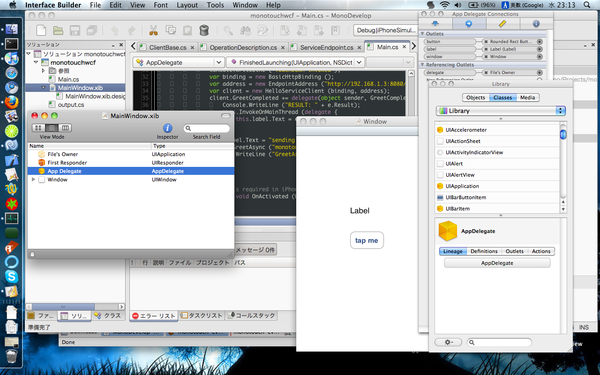
The usage in MonoTouch almost the same as Moonlight does, while there is no "async-only" limitation in the runtime. You can use sync operation calls. Though I used event-based async model in the example above. (The future versions of svcutil might stop supporting sync calls due to moonlight proxy generator limitation. But sync client should work at runtime level anyways.)
On the other hand, there is a big limitation in MonoTouch in general - you cannot dynamically generate runnable code. And since WCF often involves dynamic code generation, you have to be caucious to not do it. For example, you have to override ClientBase<T>.CreateChannel() by using ClientBase<T>.ChannelBase<T> . If you don't do that, the default Channel property is generated by ChannelFactory<T>.CreateChannel() method, which dynamically creates an implementation of the contract interface using System.Reflection.Emit API.
I haven't explained how to prepare Moonlight environment. Theis a wiki page for instructions I linked above (I assume it will be frequently updated, so I'm not going to give the anchor to the build instruction section now).
Also, when creating moonlight apps, make sure you have 'moonlight-web-devel' package (in case it is available in your distro) or some sort of equivalents (e.g. "MoonSDK") installed and set up.
Now, let's build a simple app and see it's working. (NOTE: Here I use the latest version of svcutil which includes support for event-based async call I explained on Day 5.)
While it is possible to create a Moonlight application from console using "smcs" and "mxap" tools, I take the easiest way to create Moonlight project.
<!-- clientaccesspolicy.xml -->
<access-policy>
  <cross-domain-access>
    <policy>
      <allow-from http-methods="*" http-request-headers="*">
        <domain uri="*">
        </domain>
      </allow-from>
      <grant-to>
        <resource path="/" include-subpaths="true">
        </resource>
      </grant-to>
    </policy>
  </cross-domain-access>
</access-policy>
// Page.xaml.cs
this.Loaded += delegate {
  var binding = new BasicHttpBinding ();
  var address = new EndpointAddress ("http://localhost:8080/test.svc");
  var client = new HelloServiceClient (binding, address);
  client.GreetCompleted += delegate (object o, GreetCompletedEventArgs e) {
    System.Windows.Browser.HtmlPage.Window.Dispatcher.BeginInvoke (delegate {
        System.Windows.Browser.HtmlPage.Window.Alert (e.Result);
        tb.Text = e.Result;
    });
  };
  client.GreetAsync ("moonlight");
};
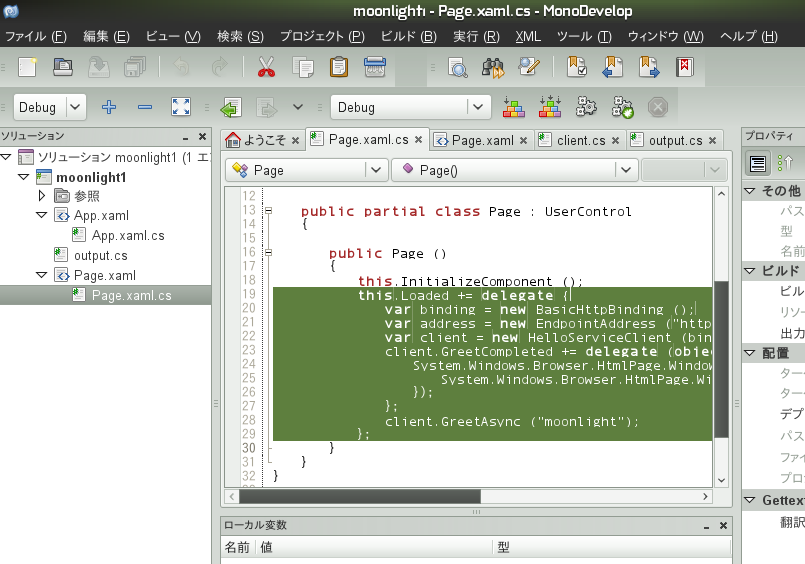
Until today I haven't explain any of .config file support while lots of WCF introductions do. I personally don't like WCF config support which rather brought confusion (and I was right; WCF 4.0 came with some simplification in this area), but if we want to use ASP.NET, we sort of need to use it.
We partially support service and client configuration by config files. A WCF configuration would look like this:
<configuration>
  <system.serviceModel>
    <services>
      <service name="HelloService" behaviorConfiguration="b">
        <endpoint binding="basicHttpBinding" contract="IHelloService" />
      </service>
    </services>
    <behaviors>
      <serviceBehaviors>
        <behavior name="b">
          <serviceMetadata httpGetEnabled="true" httpGetUrl="wsdl" />
        </behavior>
      </serviceBehaviors>
    </behaviors>
  </system.serviceModel>
</configuration>
By having this as "service.exe.config", you can omit these lines:
-    host.AddServiceEndpoint (
-      typeof (IHelloService), binding, address);

-    var meta = new ServiceMetadataBehavior () {
-      HttpGetEnabled = true,
-      HttpGetUrl = new Uri ("wsdl", UriKind.Relative) };
-    host.Description.Behaviors.Add (meta);
Note that configuration support is valid only on the full .NET profile. In Moonlight and MonoTouch there is an alternative (and much simpler) way to give configuration ("ServiceReferences.ClientConfig" file). I don't explain it here - try googling ServiceReferences.ClientConfig.
.svc files in ASP.NET are processed by an IHttpHandler(Factory) to generate a service hosting class that internally starts ServiceHost and serves HTTP requests as a HTTP transport implementation. We do the same.
Now, it's time for instructions. First, create one-liner "test.svc" file as:
<%@ServiceHost Service="HelloService, service" %>
Then comment out the entire "Test" class from service.cs.
+ /*
  public class Test
(...)
  }
+ */
Create "bin" directory, and compile the service class into a library this time:
$ mkdir bin
$ gmcs -t:library -out:bin/service.dll service.cs -pkg:wcf
To run the service in ASP.NET, you need a configuration (now that you don't have configured service host in Test class). To do it, use web.config. Copy the example config above:
$ cp service.exe.config web.config
Then run:
$ xsp2
Now your service is hosted at http://localhost:8080/test.svc (note that the URL now ends with "test.svc"). Go to http://localhost:8080/test.svc/wsdl , there should be the WSDL we exposed at Day 5.
ASP.NET integration is under some tricky situation to fit with existing HttpListener-based channel implementation, and actually have some safety nets that blocks concurrent calls. It would work, but is not likely to scale so far.
Though, as a HTTP server, xsp outperforms HttpListener a lot, so it may work nicer in the future (unless you hit WCF-specific bugs). The simpler (especially for debugging) is those without xsp. I have to admit that ASP.NET integration is somewhat buggy so far.
]]>When you create a ServiceHost with your service implementation class, WCF creates an object of "ServiceDescription" that describes the service details, such as set of endpoints, debugging support and service throttling. It is exposed as Description property of the ServiceHost instance.
As I explained Day 2 a bit, a service class may implement more than one service contract interfaces. Each service contract in the service is bound to a service endpoint URI (EndpointAddress) and a Binding. This set of A(ddress), B(inding) and C(ontract) are represented as a ServiceEndpoint class. To reflect these, a ServiceDescription has an Endpoints property which is a collection of ServiceEndpoints.
To explain how to do it, I have to explain "service behaviors". A service behavior, which is represented as IServiceBehavior interface, is to add additional facilities or give behavioral changes to the service. ServiceDescription has a set of IServiceBehavior implementations as Behaviors property.
WSDL output support is represented as one of such an implementation of IServiceBehavior, namely ServiceMetadataBehavior. For example, to enable WSDL output, modify service.cs of Day 2 as:
-    var host = new ServiceHost (typeof (HelloService));
+    var host = new ServiceHost (typeof (HelloService));
+    var meta = new ServiceMetadataBehavior () {
+      HttpGetEnabled = true,
+      HttpGetUrl = new Uri ("wsdl", UriKind.Relative) };
+    host.Description.Behaviors.Add (meta);
Run service.exe, and then visit http://localhost:8080/wsdl in your browser. It will show you the corresponding WSDL.
On the client side, it is non-coding land. In the example in Day 2, we wrote "HelloClient" class by our own. However, by consuming the service's WSDL, we actually don't have to write that class. Instead, we can use "svcutil" tool. It is based on the same tool in Windows SDK (SvcUtil.exe).
To use it, start service.exe first and then run:
$ svcutil http://localhost:8080/wsdl
So far it does not exactly behave like svcutil.exe in .NET, but gives resulting C# code as "output.cs".
Then, edit client.cs of Day 2 as:
- [ServiceContract]
- public interface IHelloService
- {
-   [OperationContract]
-   string Greet (string name);
- }

-    var client = new HelloClient (binding, address);
+    var client = new HelloServiceClient (binding, address);
Then compile two sources into an exe:
$ gmcs client.cs output.cs
The resulting client.exe should work as the earlier client.exe used to do.
As of the end of year 2009, svcutil and WSDL support is in somewhat early stage, namely:
Our svcutil can also generate service contracts in "asynchronous" pattern. Use -async command line option, and you'll get an interface like:
$ svcutil http://localhost:8080/wsdl -async
[ServiceContract]
public interface IHelloService
{
    [OperationContract (AsyncPattern = true)]
    IAsyncResult BeginGreet (string name,
                 AsyncCallback callback,
                 object state);
    string EndGreet (IAsyncResult result);
}
Today in svn trunk I added support for another async alternative: event-based async operation pattern, which is at first introduced for Silverlight and then incorporated to .NET too. The corresponding option is "-targetClientVersion:Version35" or "-tcv:Version35" (aligned to .NET's svcutil.exe). Use it along with "-async" option. This asynchronous pattern is implemented in the (auto-generated) client class and is used like:
$ svcutil http://localhost:8080/wsdl -async -tcv:Version35
public class Test
{
  public static void Main (string [] args)
  {
    string name = args.Length > 0 ? args [0] : "anonymous joe";
    var binding = new BasicHttpBinding ();
    var address = new EndpointAddress ("http://localhost:8080/");
    var client = new HelloServiceClient (binding, address);
    client.GreetCompleted += delegate (object o, GreetCompletedEventArgs e) {
      Console.WriteLine (e.Result);
    };
    client.GreetAsync (name);
    Console.WriteLine ("Type [CR] to quit");
    Console.ReadLine ();
  }
}
Again, note that the latter pattern is available only in trunk so far.
WSDL support is mostly about full .NET compatibility and not for Moonlight or MonoTouch. You cannot do any of above for those limited environment.
In Silverlight, client proxies are generated by "slsvcutil.exe", which is svcutil.exe for Silverlight.
However, creating client proxies using svcutil is partly possible and especially recommended for MonoTouch. Unlike slsvcutil.exe, we have some extra command line options on svcutil.exe itself:
Note that Silverlight usually uses the event-based asynchronous pattern explained above, and it is (I repeat again) available only in svn trunk.
We don't have corresponding feature in MonoDevelop yet ("Add Service Reference" in Visual Studio), but it will be done at some stage. So far, live with svcutil.exe or manually write proxies.
]]>Messaging system is tied to message serialization system. WCF has "data contract" as its own data serialization framework. Objects that are attributed as [DataContractAttribute] are serialized in its own manner i.e. only fields and properties attributed as [DataMemberAttribute] are written to the serialization output.
A simple usage example:
[DataContract]
public class UserInfo
{
  [DataMember]
  public string UserName { get; set; }
  [DataMember] // whoa, are you planning to send it via SOAP?
  public string Password { get; set; }

  public string Annotation { get; set; }
}
In the example ablve, only UserName and Password will be serialized.
Data contract is actually sort of fake, you can serialize and deserialize non-datacontract objects. For example,
[ServiceContract]
public interface IRequestAnything
{
    [OperationContract]
    Message Request (Message input);
}
In this contract you can send and receive any kind of Messages. If your input and/or output do not fit any of the supported serialization strategy and you are willing to handle them by yourself, it is useful.
A Message can be created by a lot of CreateMessage() method overloads. For example, CreateMessage(messageVersion, soapAction, bodyXmlReader) is useful to create a message from server replies, and CreateMessage(MessageVersion, soapAction, bodyObject) is useful to create a message from a serializable object (for both cases you wouldn't have to do it usually though). WCF internally uses those methods to create and read messages.
A Message also has a set of "properties". They do not show up in outputs, but may control the message transfer, or serialization. For example, you can use HttpRequestMessageProperty object which controls HTTP transport, for example by adding your own HTTP request header items.
The last one I explain here is sorta confusing; you can sort of control the actual creation of messages by using "message contract", represented as [MessageContract] attribute. It is placed on sort of a data class where instances of it are to be serialized and deserialized.
Under message contract, members of the class with [MessageHeader] attribute are processed as message Headers, and members with [MessageBody] become the Body of the message. They can be any type and serialized using data contract serializer explained above. So, its' sort of confusing, but the usage is rather about message serialization, not arbitrary object serialization.
In mono 2.6, I haven't finished (actually even haven't started) working on message fault contract support (such as FaultContractInfos). Things like MessageFault should work, but any further complicated contract stuff is left untouched yet.
]]>